How do I make Anki flashcards with ChatGPT?
By Jam HsiaoTested Updated
Ask the chatbot for cards as tab-separated text — front, tab, back, tab, tags, one card per line, inside a code block — using the prompt below. Paste its reply into GuruOwl’s free CSV to Anki converter, check the preview, and download an .apkg that Anki opens. Check every card against your notes: chatbots get facts wrong.
The prompt
Copy this into ChatGPT, Claude or Gemini, replace the two bracketed parts, and send it. Each rule prevents a specific problem: the header line tells the converter which column holds the tags, and the others stop numbering inside the front, Markdown asterisks on the card, and facts the model added on its own.
Make Anki flashcards from the text below.
Rules:
- Put everything in one plain-text code block. No numbering and no Markdown inside the block.
- First line, exactly: Front, a TAB, Back, a TAB, Tags.
- Then one card per line in the same order: the front, a TAB, the back, a TAB, the tags.
- Tags: one or two lowercase words, separated by spaces.
- One fact per card. Keep each back under 25 words.
- For a definition or a key term, you may write the front as a cloze instead — {{c1::the hidden part}} — and leave the back empty.
- Use only facts stated in the text. Do not add anything.
Make about [number] cards.

Text:
[paste your notes here]A good reply looks like this — the header line and three of the cards from our test. The gaps are tab characters; the cloze card has an empty back:
Front	Back	Tags
Where does glycolysis take place?	In the cytoplasm	glycolysis
Glycolysis splits one glucose into two molecules of {{c1::pyruvate}}.		glycolysis
What is the final electron acceptor of the electron transport chain? Oxygen, which forms water oxphosStep by step
- 1Paste the prompt and your notes into the chatbot. Work a few pages at a time; a long chapter in one message tends to get uneven coverage.
- 2Check the reply: one code block, the Front / Back / Tags line first, then one card per line with no numbers. If something is off, ask it to fix that one thing.
- 3Copy the block with its Copy button. Text selected from an ordinary chat reply can lose its tabs, and then every card lands in one column.
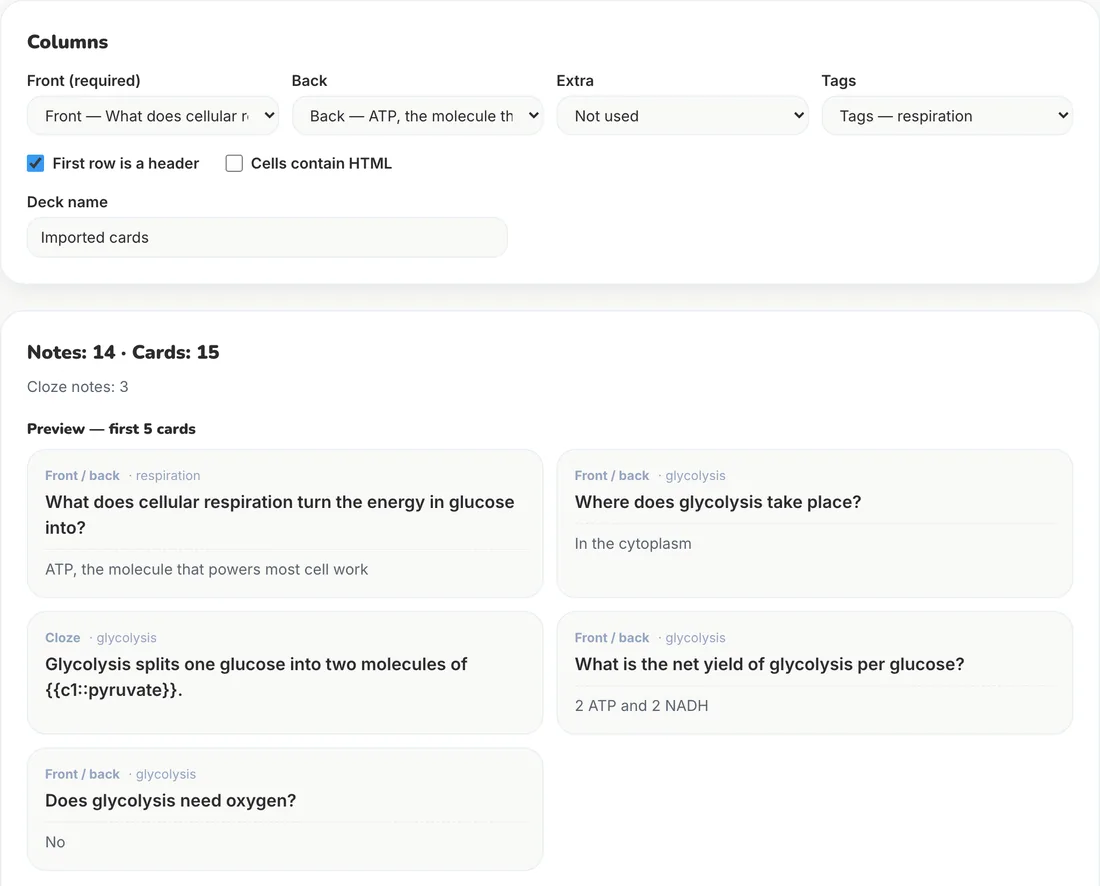
- 4Open CSV to Anki, choose Paste text, and paste. The tab separator is detected and the header line maps the columns to Front, Back and Tags.
- 5Read the preview against your source, fix or delete wrong lines in the text box, then select Build deck and download the .apkg. On a phone, open your Files app, press and hold the deck in Downloads and choose Share → Guru.
- 6Open the .apkg in Anki Desktop, AnkiMobile or AnkiDroid. Cloze lines arrive as cloze cards, one card per {{c1::…}} number.
What we tested
On November 3, 2026 we gave Claude Opus 5.5 the prompt above with a 200-word passage on cellular respiration and asked for about 14 cards. It returned one code block: the header line and 14 cards — 11 question-and-answer cards and 3 cloze cards, one of them with two deletions. Pasted into CSV to Anki, the tab separator was detected, the header line mapped Front, Back and Tags, and the preview showed 14 notes and 15 cards. The deck built and downloaded; opened again with our APKG to CSV converter, all 14 notes came back with their fronts, backs and tags intact.
Every card matched the passage, which is what the “use only facts stated in the text” rule is for. We did not run the prompt in ChatGPT or Gemini for this page. It asks only for plain text, so nothing in it is specific to one model, but check the reply the same way whichever you use.
Common problems and fixes
| What you see | Why | Fix |
|---|---|---|
| Every card is in one column | The tabs became spaces when you copied | Copy with the code block’s Copy button, or ask for “ | ” between fields and choose Pipe as the separator. |
| The tags are missing | The reply has no Front / Back / Tags line, so nothing says column 3 is tags | Under Columns, set Tags to column 3 — or ask for the header line. |
| The first card says “Front / Back” | The header line was not recognised as one | Tick “First row is a header”. |
| Fronts start with “1.” or “-” | The model numbered the list | Ask for “no numbering”, or delete the numbers in the text box before building. |
| Cloze cards show [c1: …] or ((…)) | The model invented its own cloze syntax | Anki only understands {{c1::…}} with two colons. Ask for exactly that form. |
| Cards show **asterisks** | Markdown inside the block | Ask for plain text, or turn on “Cells contain HTML” and ask for <b>…</b> instead. |
| A card states something your notes do not | The model added outside knowledge | Delete it. Keep “Use only facts stated in the text” in the prompt. |
A chatbot or a dedicated generator?
A chatbot is quick for a page of notes you already have as text. For a whole PDF — a lecture deck or a textbook chapter — PDF to Anki reads the document itself, keeps a page reference on every card and lets you edit the deck before export. GuruOwl vs ChatGPT for Anki compares the two in detail.
Frequently asked questions
Can ChatGPT make an .apkg file directly?
A chat reply is text, so the dependable route is to have it write tab-separated cards and convert them: paste them into CSV to Anki for an .apkg, or save them as a .txt file and use File → Import in Anki Desktop.
Which is better for Anki cards: ChatGPT, Claude or Gemini?
For this workflow the format matters more than the model, and the prompt asks only for plain text. We ran it in Claude Opus 5.5 for this page. Whichever you use, read every card against your source before you study it.
Can I make cloze cards this way?
Yes. Ask for the front as {{c1::hidden part}} with an empty back. The converter turns such lines into cloze notes, one card per number, so {{c1::…}} and {{c2::…}} on one line make two cards.
Do I need Anki Desktop?
No. The converter builds the .apkg in your browser, and AnkiMobile, AnkiDroid and Guru all open .apkg files. Anki Desktop is only needed if you prefer its own text importer.