Anki Image Occlusion Generator
Make Anki image occlusion cards from an image or PDF page: labels are detected for you, every mask is editable, and the deck exports as a real .apkg.
Open the full Image Occlusion editor
Multiple PDF pages, full mask editing with undo, card preview, and a real .apkg download. The demo below is a one-page taste of the same engine.
Cover the labels. Then test yourself.
The masks below are real controls. Reveal the answer, remove a bad mask, or draw a missing one before you confirm.
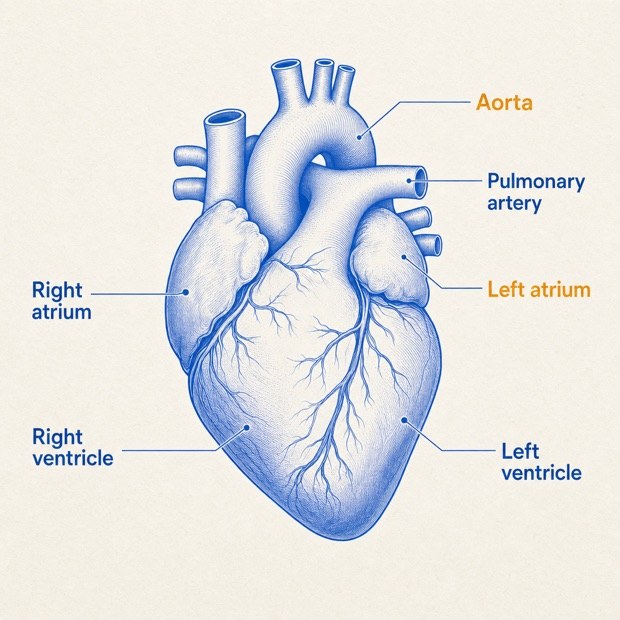 HiddenHiddenHiddenHiddenHiddenHidden
Image occlusion is one of the fastest ways to learn anatomy, histology, pathways, maps, and any labeled diagram: cover one label, recall it, then reveal the answer. The slow part is making the cards. GuruOwl’s free online editor accepts a PNG, JPEG, WebP, or PDF, proposes masks for printed labels, and still lets you draw, move, resize, rename, or delete every box before export.
No account is required. Add an image or choose PDF pages, review and confirm the masks, preview the exact cards, then download a standard .apkg for Anki Desktop, AnkiMobile, or AnkiDroid; sync from a client to use the deck on AnkiWeb. For a full textbook or lecture pack, the signed-in Expert workflow can also find likely diagram pages across the PDF and generate them in a larger deck.
Make image occlusion cards from an image or PDF
Use a PNG, JPEG, WebP, or pick pages from a PDF. The standalone editor is free, needs no account, and does not store the source file.
Image occlusion masks you can edit, not guess at
Let the model propose boxes for printed labels, or draw them yourself. Move, resize, rename, delete, undo, and redo until the card tests exactly what you intend.
Preview and export a real .apkg
Confirm each page, preview one card per mask, then download a standard Anki package that opens in Anki Desktop, AnkiMobile, or AnkiDroid; sync from a client to use the deck on AnkiWeb.
Whole-PDF image occlusion when a chapter needs it
The signed-in Expert workflow can scan a chapter or textbook for likely diagram pages, generate occlusion cards, and include them in a larger editable deck.
Frequently asked questions
How do I make image occlusion cards for Anki?
Open the free editor, add a PNG, JPEG, WebP, or PDF, and choose a page. Review the proposed masks or draw your own, label and confirm each mask, preview the cards, then download the .apkg and open it in Anki. Unlike Anki’s built-in tool and Image Occlusion Enhanced, GuruOwl can propose masks for printed labels in the browser; manual drawing remains available when auto-detection misses something.
What do I upload?
The free editor accepts PNG, JPEG, or WebP images up to 5 MB and PDFs up to 25 MB. With a PDF, choose the pages you want to turn into cards. For larger whole-document generation, upload the PDF to the signed-in Expert workflow; full-document occlusion costs 3 credits per page.
Does it work on scanned pages?
The free one-page demo accepts images and scanned PDFs, runs OCR in your browser, and marks the result for review. Full-document Expert generation still needs a PDF text layer because it places masks from the file’s exact text coordinates. Digitally published textbooks, exported lecture slides, and OCR’d scans work best; image-only pages are skipped rather than masked in the wrong spot.
Can I edit the masks before exporting?
Yes. You can draw, move, resize, rename, or delete masks, plus undo, redo, and restore the latest automatic result. A page is exported only after you explicitly confirm it.
How many masks does a diagram get?
Up to 12 labels per page, and a page needs at least 3 masks worth keeping or it is left out entirely — a plate with two readable labels makes a better basic card than a thin occlusion card.
Keep exploring

Turn your PDF into a deck you’ll actually review
Web signup includes 50 credits. Estimated generation: 1 credit/page for Standard or 3 for Expert; check the estimate before confirming. No card required.
Review your Anki decks on iPhone
Import .apkg and .colpkg decks for free. Daily review is free, too.
Editing and cross-device sync require Pro.
Get Guru for iPhone