PDF to Anki Converter
Convert a PDF into editable Anki flashcards with AI, then export a real .apkg. Try the first pages free, no signup, and review every card before it reaches Anki.
Try it right here — no signup
Try the first 3 text pages of a PDF up to 5 MB without an account. This preview uses server-side AI. Full decks and .apkg export require a free account and generation credits. Scans need OCR in a scanner or PDF editor first.
Upload a lecture PDF, textbook chapter, or review guide. GuruOwl reads the whole document, extracts the testable facts, and writes structured Anki cards — cloze-first, linked back to the page they came from, and editable before anything reaches your collection. Export a standard .apkg for Anki Desktop, AnkiMobile, or AnkiDroid.
Use the free upload demo on this page (first pages of a text PDF, no signup) to see real cards before you commit. A free account adds whole-document generation, image occlusion for diagrams, and .apkg export.
Reads the whole document
Lecture slides, review guides, and textbook chapters up to 50 MB, processed end to end — not a few paragraphs pasted into a chatbot.
AI extracts what is actually testable
Atomic cloze and basic cards with tags and page references. Diagrams become image-occlusion cards when labels are present.
Daily plan + AI coach after export
Unlike pure converters, GuruOwl schedules reviews and can grill you (Feynman / active recall) so the deck becomes memory, not a file you never open.
Real .apkg export
Download a standard Anki package — works in Anki Desktop, AnkiMobile, and AnkiDroid; sync from a client to use the deck on AnkiWeb. Or push straight to Anki with one click.
How do I convert a PDF into Anki flashcards?
Upload the PDF, let GuruOwl draft cloze-first cards from its text, edit them against the page each card cites, and export a standard .apkg that Anki Desktop, AnkiMobile and AnkiDroid import. The PDF needs a selectable text layer; the free demo above runs on the first 3 pages without an account.
- 1Try the demo above with your own PDF: its first 3 text pages (up to 5 MB) become real cards, no account needed.
- 2For the whole document, create a free account — it comes with 50 credits — and upload the PDF (up to 50 MB) under Materials.
- 3Choose Standard (about 1 credit per page) or Expert (about 3 per page; it adds image occlusion for labelled diagrams). The estimate is shown before you confirm.
- 4Review the draft cards against the pages they cite: tighten the wording, merge, or delete what you do not need.
- 5Export the .apkg and open it in Anki, or send the cards to a running Anki Desktop with AnkiConnect.
Scanned pages without a text layer need OCR in a scanner app or PDF editor first. If you already have the material as text — notes in a document, or a chatbot’s draft — CSV to Anki turns a two-column table into a deck, and this answer covers the chatbot route.
Do source page references survive Anki export?
Yes in this recorded sample: on September 9, 2026, we uploaded our original two-page geometry PDF to GuruOwl, generated 8 notes with the Standard workflow, edited the first note, and downloaded the .apkg through the production export button. The package contains 10 Anki cards because two notes have both c1 and c2 deletions.
- All 8 notes retain a separate Source field, covering pages 1 and 2. For example:
guruowl-source-sample · p.1. - The saved edit and its explanation survive export. The answer template includes the Source field. Desktop Anki on macOS imported the package and reported “8 new notes imported”.
- Source is a plain-text filename and page reference, not an embedded PDF or a live link. When a note has no page number, export includes only the filename. Always check AI-generated references yourself.
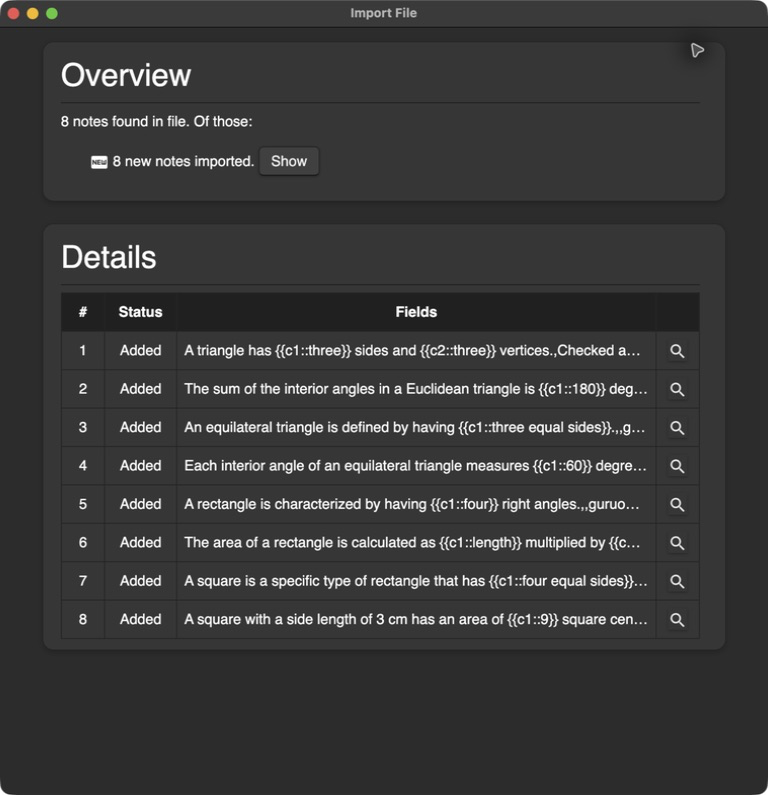
Download the original PDF · Download the exported Anki deck · Inspect all exported fields and file hashes (JSON)
To reproduce: import the deck in Anki Desktop and browse the guruowl-source-sample deck. Expect 8 notes / 10 cards. Inspect the Text, Extra and Source fields, then compare their page numbers with the PDF. You can also open this package in our local APKG viewer. The original sample is reusable under CC0 and contains no private or third-party course material.
This is a developer check of one text-only PDF, not an independent audit or proof for scanned PDFs, images, or every Anki client. PDF generation uploads the document for processing; only the APKG viewer keeps deck contents entirely on your device. The free PDF preview does not require signup; full-deck generation and export require an account and generation credits.
Using the deck on AnkiWeb
AnkiWeb does not import .apkg files directly. Import into Anki Desktop, AnkiMobile or AnkiDroid, then sync to AnkiWeb. This is the workflow in the official Anki manual.
Frequently asked questions
Can ChatGPT convert a PDF to Anki cards?
ChatGPT can draft question-and-answer text from a PDF, but you still format it, fix the cloze syntax, and import it yourself, and there are no page references to check the claims against. This page produces an editable deck with source links and exports a real .apkg, so the Anki import is one file instead of a copy-paste session.
How do I convert lecture notes into Anki cards?
Drop the PDF into the demo on this page to see cards from the first pages. For the full deck: create a free account, upload under Materials, pick Standard or Expert, review and edit the draft cards against the source, then export the .apkg or send it to Anki through AnkiConnect.
Is there a free PDF to Anki converter?
The demo on this page is free and needs no account: the first 3 text pages of a PDF up to 5 MB, using server-side AI. A free account adds 50 credits, and the estimate is about 1 credit per page on Standard or 3 on Expert, so you see the cost before confirming. Image-only scans need OCR in a scanner or PDF editor first. No card required.
Is there an Anki add-on that does this instead?
Anki add-ons run inside the desktop app and mostly speed up writing cards by hand. This is a web converter: it reads the PDF, drafts the cards, and hands back a standard .apkg, so nothing has to be installed in Anki. Both paths end in the same collection.
Can I convert Anki cards back to PDF?
No. This page converts PDFs into Anki cards, not the other way around. To inspect an existing .apkg or .colpkg without installing Anki, use the free Anki package viewer linked below.
Does it work for medical school PDFs?
Yes — that is a primary use case. See Medical PDFs to Anki for board-checked depth and occlusion workflows.
Keep exploring

Turn your PDF into a deck you’ll actually review
Web signup includes 50 credits. Estimated generation: 1 credit/page for Standard or 3 for Expert; check the estimate before confirming. No card required.
Review your Anki decks on iPhone or Android
Import .apkg and .colpkg decks for free. Daily review is free, too.
Editing and cross-device sync require Pro.
Get the Guru app