
AnKing & Zanki on iPhone Without AnkiMobile (2026): The Three Routes
.apkg and import it into Guru, which reads it with Anki's own engine. In our 2026-09-07 test the 125 MB Zanki Physiology & Pathology deck imported into Guru as 16,966 cards in about 15 seconds with cloze, underline and images intact. The catch with route three is that AnkiHub updates don't flow in automatically — you re-import when you want a newer version.
What AnKing, Zanki and AnkiHub actually are
Zanki is the deck that defined the modern USMLE Step 1 Anki format. A Reddit user named Zanki built it in 2017 on top of the older Brosencephalon deck, from First Aid, Pathoma, Sketchy and Costanzo Physiology; the Step 1 version runs past 20,000 cloze cards, plus a ~5,200-card Step 2 deck. Its last widely recommended revision was aligned to First Aid 2018 — which is why AnKing exists.
AnKing merged Zanki, Lolnotacop and other decks into one tagged, continuously updated deck. Today it ships as the AnKing Step Deck: 30,000+ flashcards for Steps 1, 2 and 3, tagged by First Aid, Boards & Beyond, UWorld, NBME, Costanzo and more, updated weekly.
AnkiHub is how the AnKing Step Deck is distributed: a web app where you subscribe to decks, plus an add-on that installs into desktop Anki and pulls updates into your collection. The AnKing Step Deck needs the Core plan — listed at $6/month, or $55/year on the annual option (about $4.58/month) as of September 2026; Premium is $10/month, lifetime $450, and scholarships exist for students who can't pay. Prices change, so check ankihub.net.
The part that matters here: the AnkiHub add-on only runs inside desktop Anki. There is no AnkiHub iOS app. Ask on the AnkiHub forum how to use it on iPhone and the answer is "set it up on desktop first, then sync."
The three routes to AnKing on iPhone
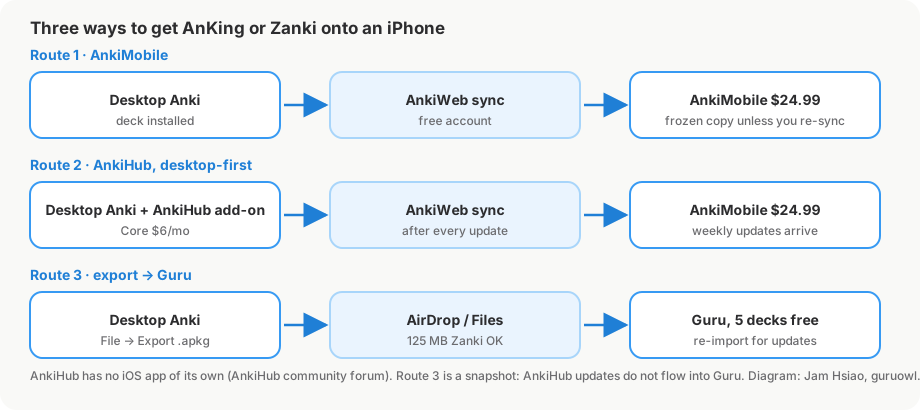
| AnkiMobile + AnkiWeb | AnkiHub via desktop, then sync | Import the .apkg into Guru | |
|---|---|---|---|
| iPhone app cost | $24.99 one-time | $24.99 one-time (AnkiMobile) + AnkiHub Core | Free to import and review; Pro from $4.99/mo |
| Needs desktop Anki | To install the deck, yes | Yes, always (the add-on lives there) | Once, to export the .apkg |
| Weekly AnKing updates on the phone | No (you're on a frozen copy) | Yes, after each desktop sync | No — re-import a fresh export |
| Scheduler | Anki SM-2 or FSRS | Anki SM-2 or FSRS | FSRS |
| Sub-deck tree preserved | Yes | Yes | Yes (counts as one top-level deck) |
| Add-ons (AnkiHub, Image Occlusion Enhanced, etc.) | No add-ons on iOS | No add-ons on iOS | n/a |
Route 1: AnkiMobile + AnkiWeb
The canonical path. Install the deck into desktop Anki, sync to a free AnkiWeb account, then buy AnkiMobile ($24.99) on the phone, log in with the same AnkiWeb credentials and sync. Only changes since the last sync travel, so daily syncs are fast. You cannot download shared decks straight into AnkiWeb — the desktop step isn't optional. Full comparison in our Anki on iPhone guide.
Route 2: AnkiHub's workflow (desktop-first)
AnkiHub has no separate mobile workflow. Its own community answer is the chain desktop Anki (with the add-on) → AnkiWeb → AnkiMobile. Subscribe on ankihub.net, the add-on installs the deck into desktop Anki, sync to AnkiWeb, and AnkiMobile picks it up. Every weekly AnKing update repeats that loop; phone reviews flow back the same way. Suggesting changes to AnKing from the phone isn't possible — AnkiHub staff have said there's no direct AnkiMobile-to-AnkiHub sync, so you sync to desktop and submit from there.
Route 3: Export an .apkg and import it into Guru
If you don't want $24.99 for AnkiMobile plus a monthly AnkiHub bill just to review on the phone, treat the deck as a file. Guru imports .apkg and .colpkg with Anki's own engine, so cards, cloze, images, audio, sub-decks and FSRS scheduling state come through as-is, and reviews use the same Again / Hard / Good / Easy grades. Importing and daily review are free for up to 5 decks, and a whole AnKing tree counts as one. The rest of this article walks through that route.
Step by step: AnKing or Zanki from desktop Anki to Guru
1. Export the deck from desktop Anki
In desktop Anki: File → Export. Under Export format choose Anki Deck Package (.apkg) and pick the deck — a parent deck export includes its child decks. Then:
- Include scheduling information — turn this on if you've already been reviewing and want your intervals and review history to travel with the cards. Off gives you a fresh deck.
- Include media — turn this on. AnKing and Zanki are image-heavy; without media you'll get blank Sketchy and pathology images.
- Leave Support older Anki versions off unless you have a reason; it makes the file bigger and slower.
Expect a large file — our Zanki Physiology & Pathology export was 125 MB, and a full AnKing Step deck with media is bigger. Exporting your entire collection (Anki Collection Package) gives a .colpkg, which Guru also imports.
2. Get the file onto the iPhone
AirDrop from the Mac, iCloud Drive via the Files app, a Safari download, or another app's share sheet all work; for a 100 MB+ file, AirDrop or iCloud Drive over Wi-Fi is least painful. Each path is covered in how to import Anki decks onto iPhone.
3. Open it in Guru
Tap the file → share sheet → Guru (or open it from within Guru). The importer runs on-device, so a 125 MB deck imports as fast as the phone can read it.
4. What survives the import
Here's what we measured on 2026-09-07 with real decks in Guru 1.5.1, on the same iPhone:
| Deck | File | Cards imported | Import time | Notes |
|---|---|---|---|---|
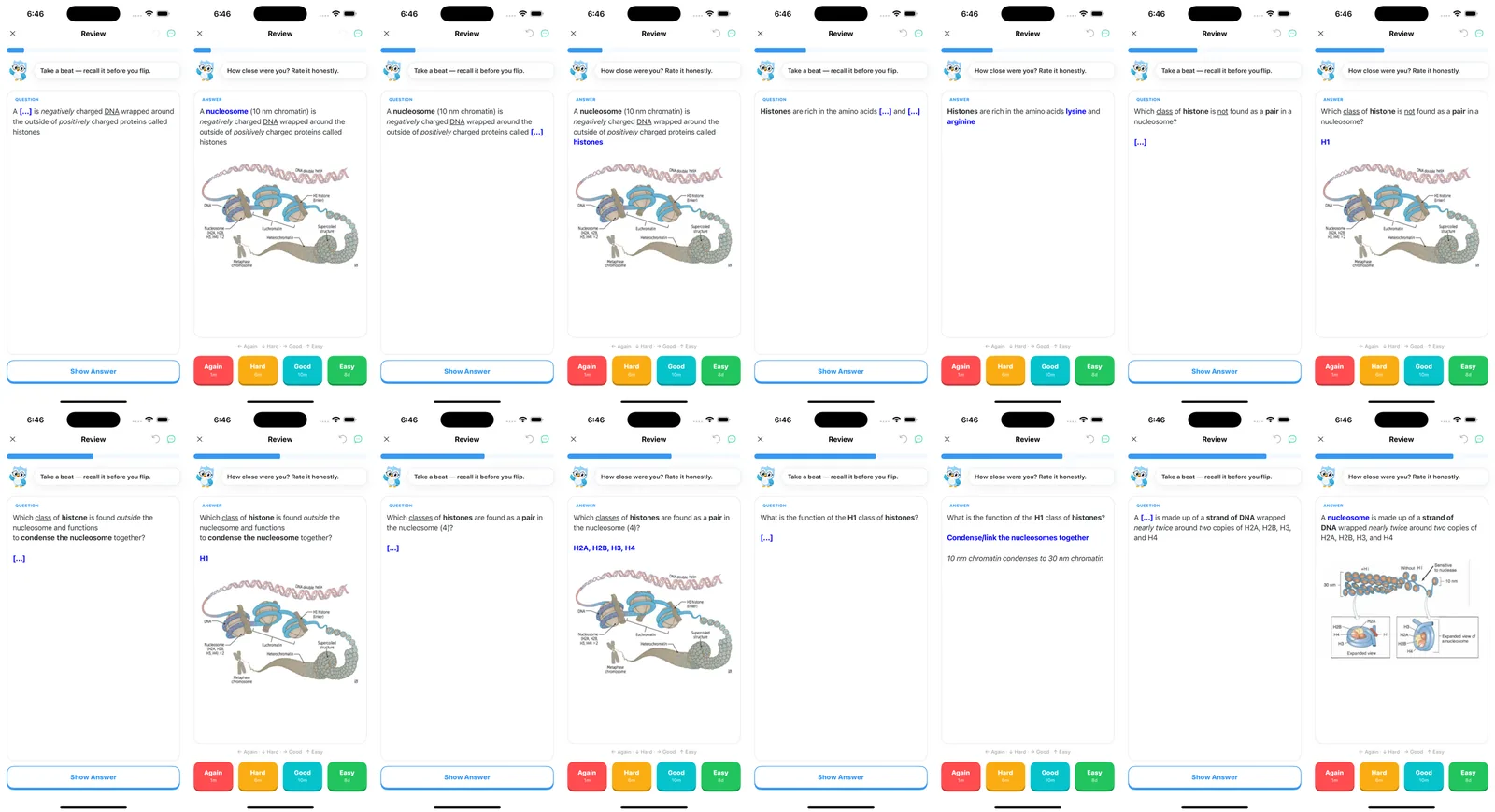
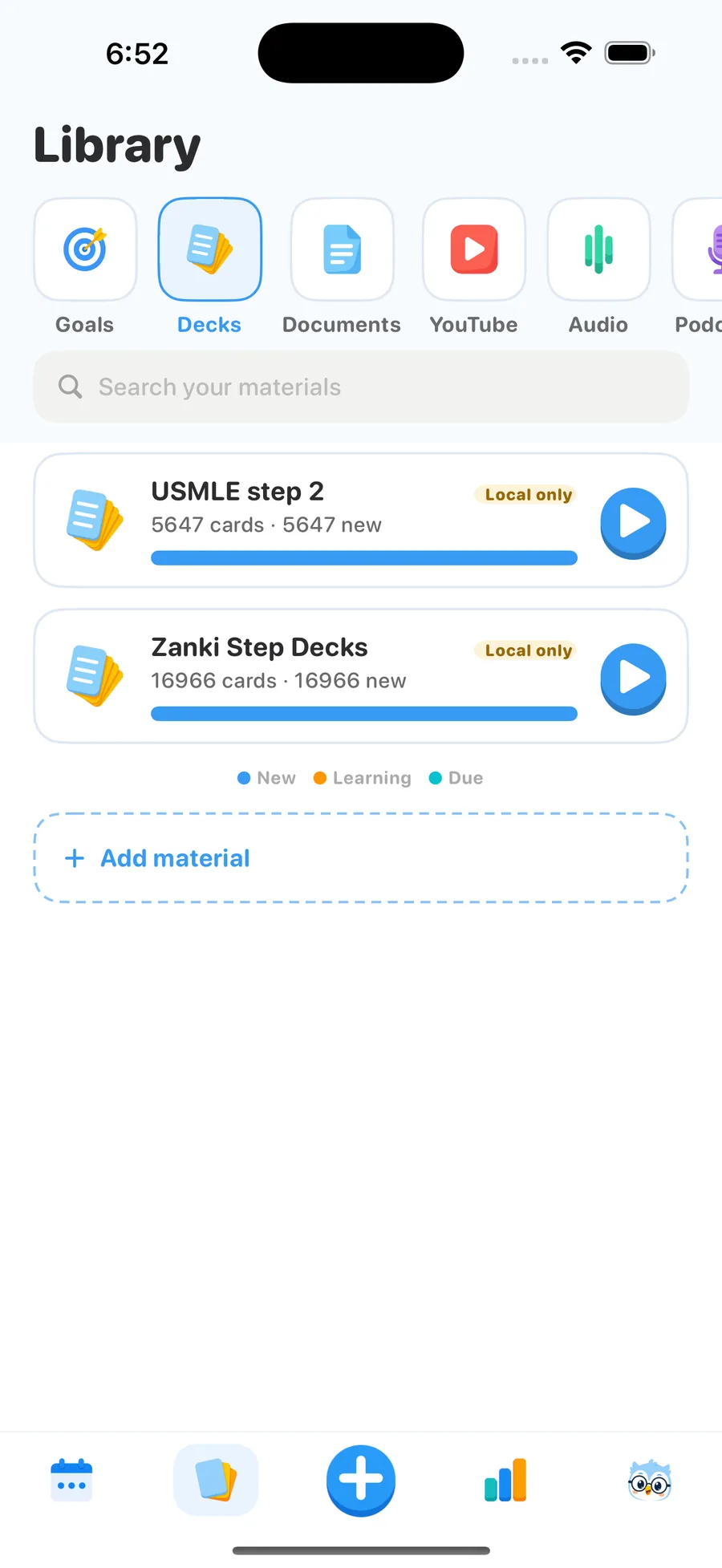
| Zanki Physiology & Pathology | 125 MB | 16,966 | ~15 s | Cloze, underline and images render correctly |
| USMLE Step 2 (23 note types, 14 cloze types) | 68 MB | 5,647 | ~10 s | All note types and cloze variants render |
| MileDown MCAT | 238 MB | 2,888 | ~5 s | Colored cloze and diagrams render; external links show as grey text |
| AnKing MCAT sample | 3.7 MB | 263 | ~5 s | Count matched; used as a re-import control, not reviewed card by card |
| First Aid 2017 Pharmacology | 5.5 MB | 1,232 | ~10 s | Cloze hints and italic Extra fields render |
| JLPT eggrolls (audio-heavy) | 121 MB, 10,107 audio files | 10,147 | 89 s | Audio plays; time is dominated by media count |
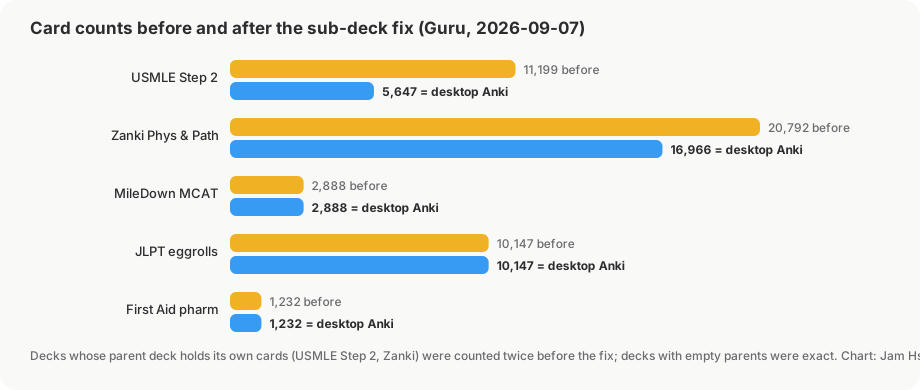
Two honest footnotes. The Step 2 test caught a bug: parent-deck subtrees were duplicated on import, so the deck first showed 11,199 cards instead of 5,647. It's fixed and ships in the next release; doubled counts on a nested deck today are that bug. And MileDown's external hyperlinks appear as grey text rather than tappable links — the content is there, the link target isn't.
What to expect with a 17,000-card deck
- Import time is seconds, not minutes. 16,966 cards in ~15 seconds. Media count matters more than card count — the 10,000-audio-file JLPT deck took 89 seconds — so a media-heavy AnKing export lands closer to a minute.
- One card per note per day. Guru buries siblings: a Zanki note with three cloze deletions shows one today and the others on later days, the way most people configure "bury siblings" for AnKing.
- The whole sub-deck tree counts as one deck. AnKing's deeply nested structure imports as one top-level deck with its hierarchy intact. The free tier allows 5 top-level decks and 2 goals — Zanki plus AnKing plus a pharm deck is three, not thirty.
- Scheduling carries over if you exported it. With Include scheduling information on, mature cards stay mature and FSRS continues from the exported scheduling state instead of treating every card as new.
Known limits (read before you switch)
- AnkiHub updates don't sync into Guru. This is the big one. Route 3 is a snapshot; when AnKing pushes updates, you re-export from desktop and re-import. If tracking weekly AnKing changes is central to your workflow, Route 2 is the honest recommendation.
- Add-ons don't exist on any iPhone app. AnkiHub, Image Occlusion Enhanced and Hint Hotkeys are desktop-only, on AnkiMobile as well as Guru. Hints and cloze variants live in the card template, and in our USMLE Step 2 test all 14 cloze types rendered correctly.
- Card editing and cross-device sync are Pro. Free covers import and daily review for up to 5 decks. Editing, sync with the GuruOwl web app, Study Lock and unlimited decks are Pro: US$4.99/month after a 3-day trial, US$39.99/year, or US$24.99 Lifetime with 5,000 AI credits. Everything exports back to
.apkg, so nothing is trapped. - Guru is not affiliated with AnKing, AnkiHub, Zanki or Anki. It reads the same file format; that's the whole relationship. Subscribe to AnkiHub if you want to support the deck's maintainers.
- iOS 17 or later.
FAQ
Can I get AnKing on iPhone without AnkiMobile?
Yes, if a snapshot is acceptable instead of a live-updating deck. Export the AnKing Step Deck from desktop Anki as an .apkg with media and scheduling, move it to the phone, and import it into Guru. AnkiHub has no iOS app, so every route to the phone starts on desktop.
Does AnkiHub work on AnkiMobile? Indirectly. The add-on runs in desktop Anki only; updates reach AnkiMobile through a normal AnkiWeb sync after desktop has synced. There is no direct AnkiMobile-to-AnkiHub connection.
Is Zanki still worth using in 2026? Most students have moved to AnKing, which absorbed Zanki and is updated weekly; Zanki's last widely used revision tracks First Aid 2018. A Zanki export imports fine — the 16,966-card test deck above is Zanki — but the maintained deck for boards is AnKing.
Will my scheduling carry over from desktop? Yes, as long as Include scheduling information was on when you exported. Guru reads the scheduling state (due dates, stability, difficulty) and continues with FSRS; without it, every card starts as new.
What happens to the sub-decks and tags? The hierarchy imports intact as one top-level deck, and tags (AnKing's resource tags, for instance) stay on the cards. See how to open .apkg files on iPhone if you just want to inspect a deck first.
Bring your AnKing or Zanki deck to iPhone
Import the .apkg in seconds, keep your scheduling, and review with FSRS. Importing and daily review are free for up to 5 decks.
Get Guru