
How to Open an .apkg File on Any Device (Windows, Mac, Android, iPhone or Browser)
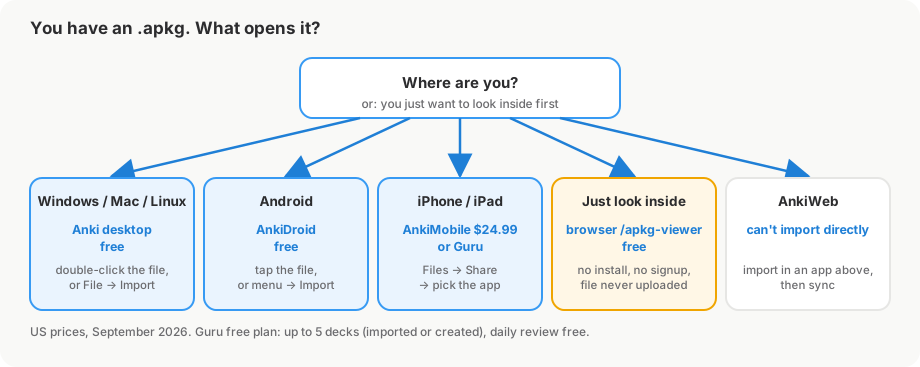
.apkg file is an Anki deck package: a zip archive with a database of cards and notes, plus the deck's images and sounds. Your computer or phone can't read it on its own. Open it in Anki on Windows, Mac or Linux (free), AnkiDroid on Android (free), or AnkiMobile ($24.99) or Guru (free for up to 5 decks) on iPhone and iPad. If you only want to see what's inside, the GuruOwl .apkg viewer opens it in any browser without installing anything. AnkiWeb can't import it directly.
Someone sends you a deck, or you download one from AnkiWeb, and your laptop or phone says it doesn't know what to do with it. I took three real shared decks apart on September 27, 2026, re-exported one with the official Anki engine, and ran all of them through the apps and the browser viewer below. Here is what opens an .apkg, what doesn't, and why a file sometimes arrives broken.
What is an .apkg file?
.apkg stands for "Anki Deck Package". It is a normal zip archive with its own extension. Anki's manual describes a packaged deck as "cards, notes, note types, and any sounds or images bundled up into a file ending with .apkg or .colpkg."
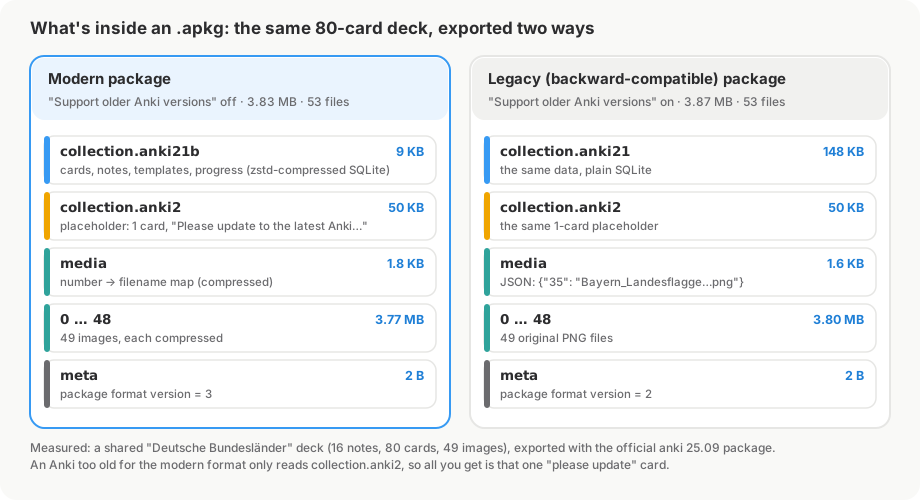
To see the parts, I re-exported a shared 80-card deck of German states with the official Anki 25.09 Python package. Listing the package gives this:
$ unzip -l german-modern.apkg
  Length   Name
      2    meta
   9145    collection.anki21b
  51200    collection.anki2
  35546    0
  64798    1
  ...      (49 numbered media files, 0 to 48)
3830013    53 files
- The collection file (
collection.anki21b,collection.anki21orcollection.anki2) is a SQLite database holding the notes, cards, note types and, if the exporter included it, scheduling and review history. mediamaps numbers to real filenames, and the numbered files (0,1,2…) are the images and sounds.- A one-card placeholder. Modern exports also carry a
collection.anki2with exactly one card: "Please update to the latest Anki version, then import the .colpkg/.apkg file again." That's the card you see if your Anki is too old to read the real data (more on that below).
Older shared decks are simpler. A 2018 Microbiology deck I tested contains only collection.anki2 and media.
Which app opens an .apkg file?
| Device | App | Price | Keeps review progress | Images and audio | How to open |
|---|---|---|---|---|---|
| Windows, Mac, Linux | Anki | Free | Yes, if exported with it | Yes | Double-click the file, or File → Import |
| Android | AnkiDroid | Free | Yes, if exported with it | Yes | Tap the file, or deck list menu → Import |
| iPhone, iPad | AnkiMobile | $24.99 once | Yes, if exported with it | Yes | Files → Share → AnkiMobile |
| iPhone, iPad | Guru | Free for up to 5 decks | Yes, if exported with it | Yes | Files → Share → Guru |
| Any browser | GuruOwl .apkg viewer | Free, no signup | No, it's read-only | Yes | Drop the file on the page |
| AnkiWeb | n/a | Free | n/a | n/a | Can't import; use an app, then sync |
How to open an .apkg file on Windows or Mac
Use Anki, the free desktop program from apps.ankiweb.net. The current version is 26.09.3, released September 23, 2026.
- Install Anki from its official site.
- Double-click the
.apkgfile. Anki's manual says you can "double-click the downloaded package to import it into Anki, or go to File > Import." - Check the import options. On Anki 23.10 and later, leave Import any learning progress unticked if the deck came from someone else and you want to start fresh.
An .apkg adds its decks to your collection. It never replaces what you already have.
How to open an .apkg file on Android
Use AnkiDroid, the free Android version. Its manual says that .apkg files "are automatically associated with AnkiDroid", so tapping one in your downloads or an email attachment asks whether to import it. You can also open the menu in the deck list and choose Import, then pick the file.
One warning from the same manual: a file named collection.colpkg "will completely replace all contents in AnkiDroid." Only import a .colpkg when you mean to swap your whole collection.
How to open an .apkg file on iPhone or iPad
iOS has no built-in app for Anki files, so the Files app will show the file but can't open it. You need an app that reads the format:
- AnkiMobile, the official app, costs $24.99 once and covers iPhone and iPad. Its manual says to tap the file, find the "Open In" or "Share" icon, and choose AnkiMobile.
- Guru is the app we make, so weigh this line accordingly. It opens
.apkgand.colpkgfiles from Files, AirDrop, Safari downloads or the share sheet, and keeps media, sub-decks and FSRS scheduling state. The free plan covers importing and daily review for up to 5 decks; Pro is $4.99 a month with a 3-day trial, $39.99 a year, or $24.99 once. It needs iOS 17 or later.
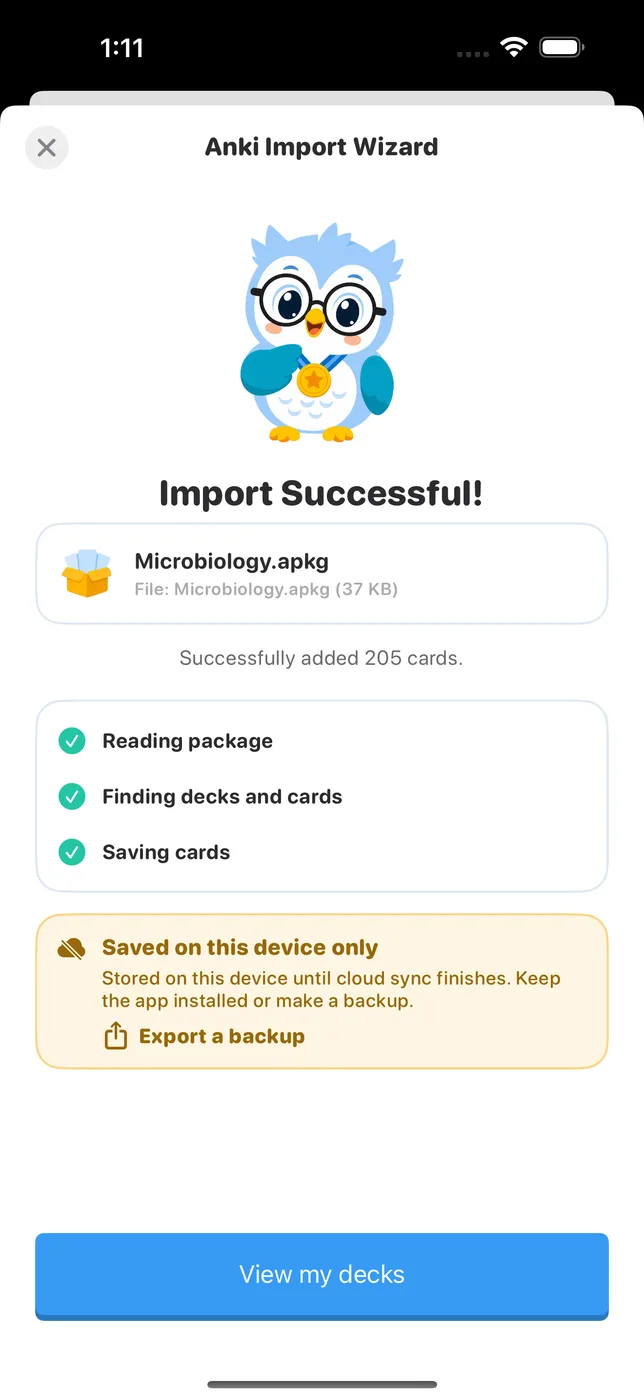
The iPhone-specific details (getting the file into Files, AirDrop from a Mac, what to check after import) are in how to open .apkg files on iPhone.
How to open an .apkg file without installing anything
If you only want to know what's in a deck before committing to it, open the GuruOwl .apkg viewer in any browser and drop the file on it. It's our tool, so here is what I measured instead of what the page claims. I tested it in a fresh, signed-out browser:
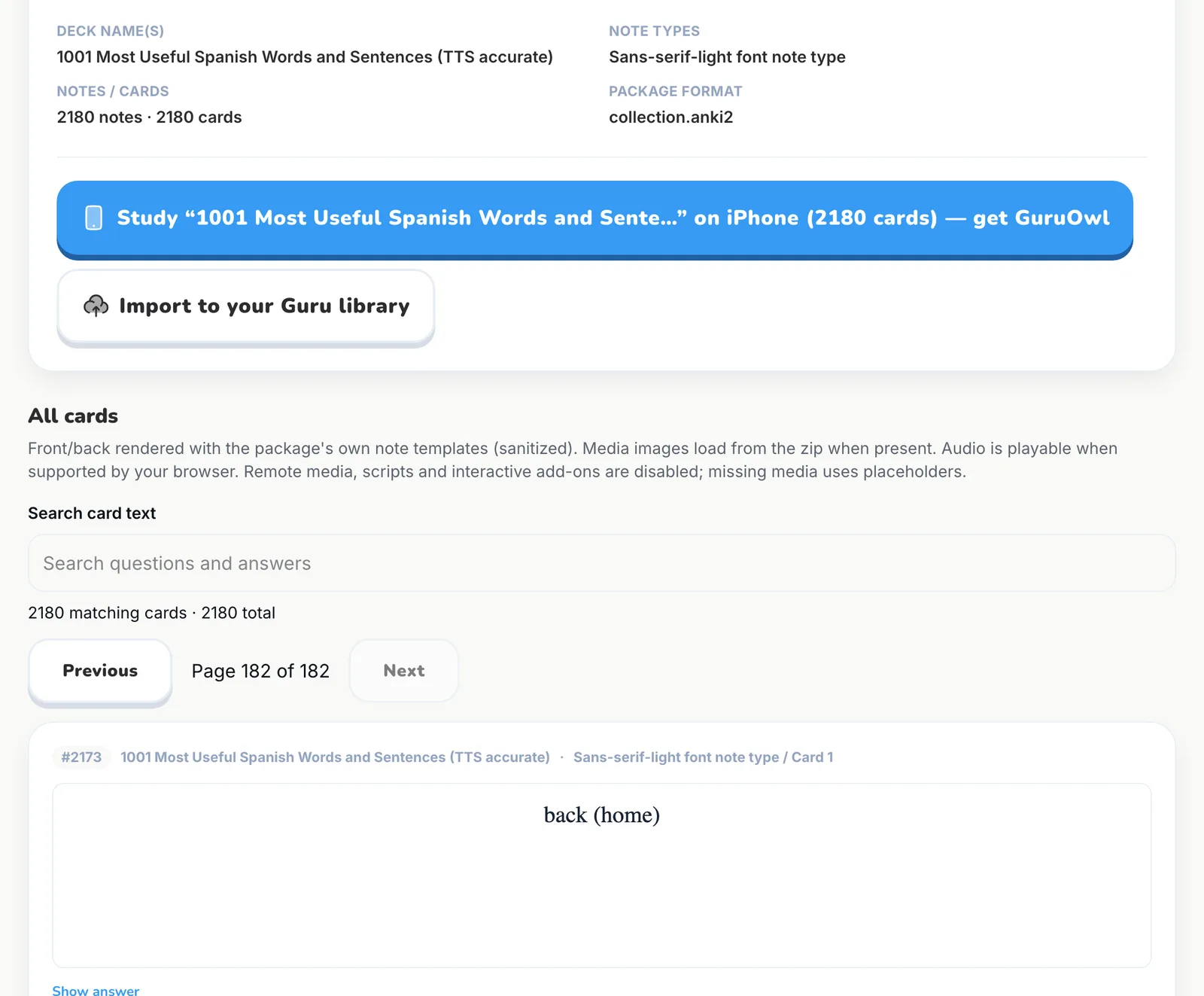
- Every card is listed, not a sample. A 55.7 MB Spanish vocabulary deck showed all 2,180 cards across 182 pages, and I paged through to the last one. If you've read that the viewer only previews the first 30 cards, that was an early version.
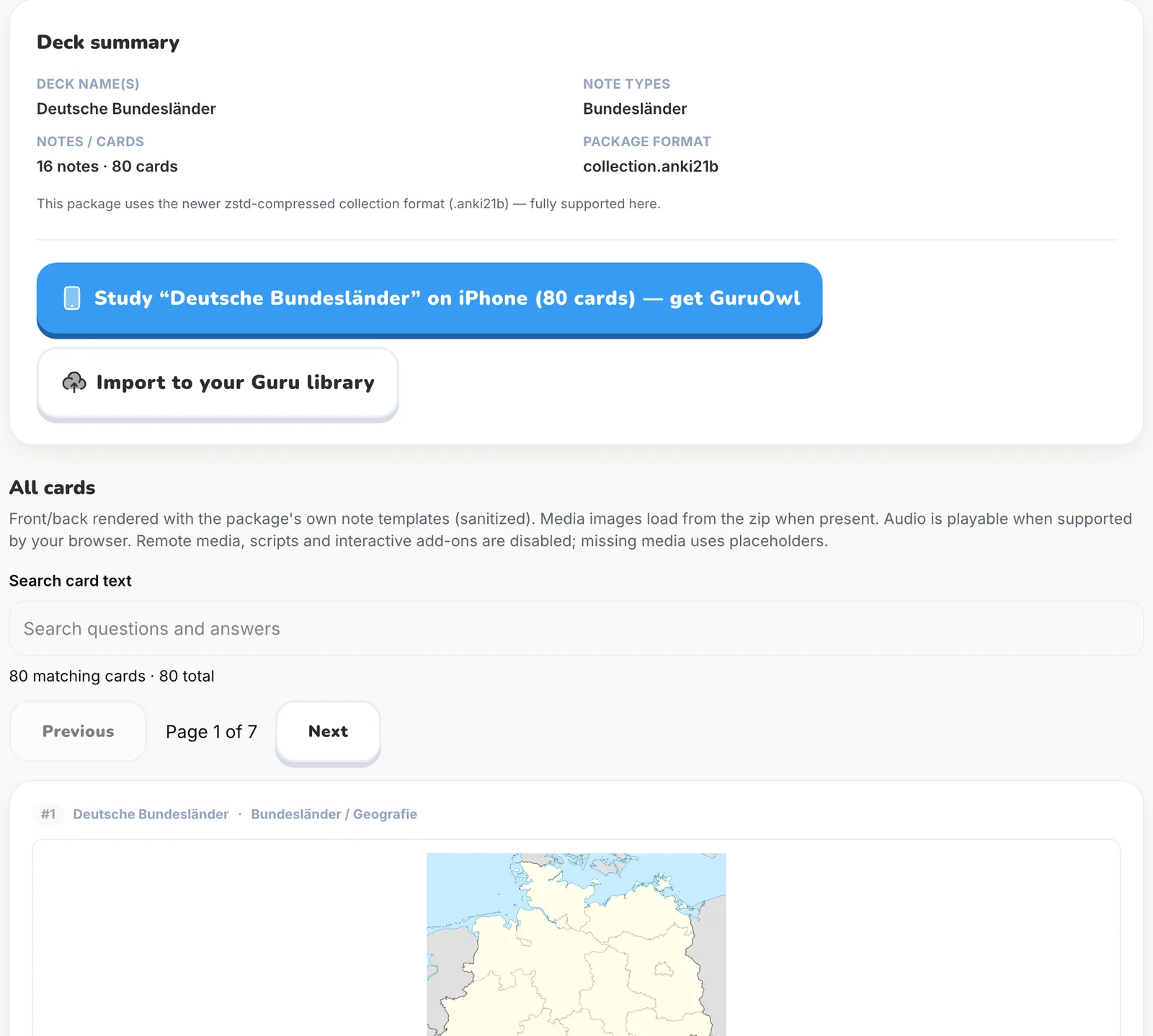
- Images and audio work. Flags and maps from the German deck rendered, and the Spanish deck's audio showed up as an audio player after Show answer.
- Old and new formats. It opened the modern
collection.anki21bexport, the legacycollection.anki21export, the 2018collection.anki2deck and a.colpkg. - Nothing is uploaded. The file is unpacked in your browser. During each test the page sent zero POST requests, and no signup was needed.
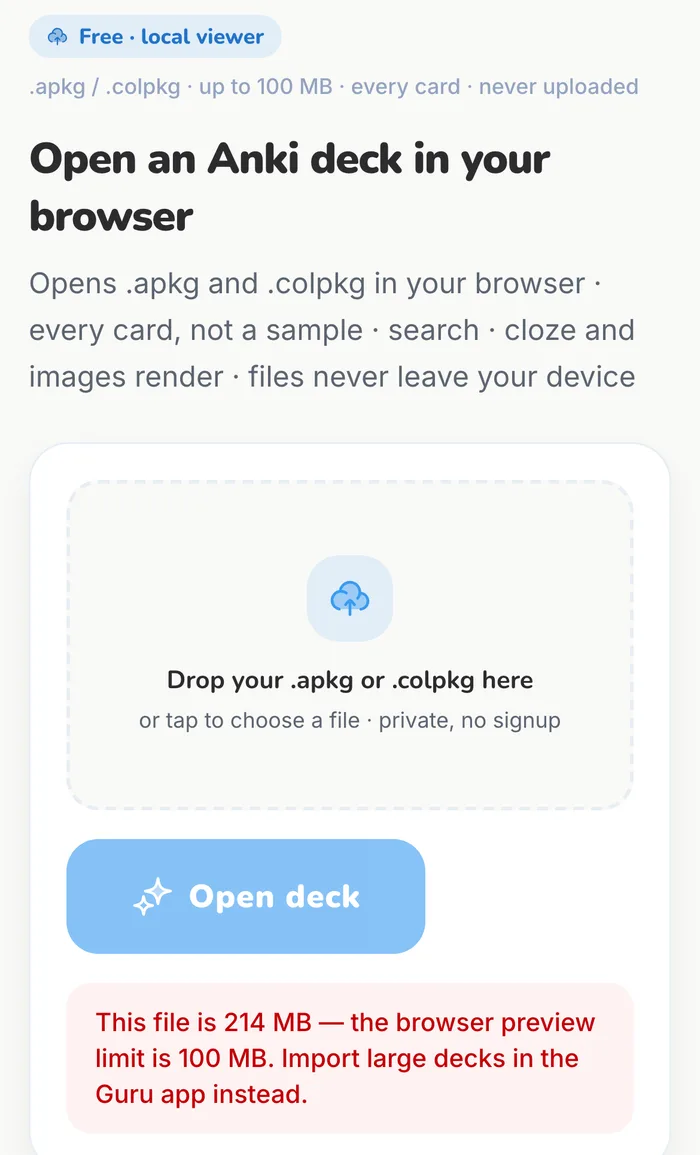
- The limit is 100 MB. A 224.6 MB deck was refused before parsing, with a message to import it in an app instead.
The viewer is for reading. To study a deck and keep its schedule, import it into one of the apps above.
Can you import an .apkg into AnkiWeb?
No. Anki's manual says: "It's not currently possible to add shared decks directly to your AnkiWeb account. You need to first import them to the desktop app, AnkiMobile, or AnkiDroid, then synchronize to upload the decks to AnkiWeb."
What's the difference between .apkg and .colpkg?
.apkgholds one deck and its sub-decks. Importing it adds to your collection. If you've imported the same deck before, Anki keeps whichever version of each note was modified most recently..colpkgis your whole collection. In Anki, "all of your current cards in Anki will be deleted and replaced by the cards from the .colpkg file." AnkiDroid works the same way. Use it to move a collection to a new device, not to share a deck.- The special case: a file named exactly
collection.apkgis a collection package from an older Anki version, even though it ends in.apkg.
Guru opens both kinds through the same import wizard.
Why won't my .apkg file open?
Your device says no app can open it, or the name ends in .apkg.zip.
The browser or mail app added .zip. Rename the file back to .apkg. Don't unzip it; apps import the package, not the loose files inside.
You get exactly one card saying "Please update to the latest Anki version." The deck was exported in the modern format and your Anki is too old to read it, so it imported the placeholder instead. Update Anki. The newer format was introduced in Anki 2.1.50 for collection packages and 2.1.52 for deck packages. If you can't update, ask the sender to re-export with Support older Anki versions ticked.
Every card shows up as new. The deck was exported without scheduling. That is the default when sharing: Anki's manual says it "will remove the entire scheduling information" so others get a clean copy. If the deck is your own, re-export with Include scheduling information, and on Anki 23.10+ tick Import any learning progress when importing.
Images or sounds are missing. The deck was exported without Include media, or the download stopped early. Download it again, or ask the sender to re-export with media included.
Your whole collection disappeared after importing.
You imported a .colpkg (or a file named collection.apkg), which replaces everything. On desktop, Anki makes a backup before a .colpkg import. Restore it with File → Switch Profile → Open Backup. These automatic backups hold card data and scheduling, not images and sounds.
The browser viewer says the file isn't a valid package. The zip itself is damaged, usually from an interrupted download. Download it again.
FAQ
Can I open an .apkg file without Anki? Yes, to read it: the browser viewer shows every card, with images and audio. To study it with spaced repetition you need an app: Anki, AnkiDroid, AnkiMobile or another app that imports Anki packages, such as Guru.
Is an .apkg just a zip file?
Yes. If you rename a copy to .zip you can open it and see the files listed above. The cards themselves are in a SQLite database, and in modern exports that database and the media are compressed, so the loose files aren't readable on their own.
Does opening an .apkg keep my review progress? Only if whoever exported it ticked Include scheduling information. Shared decks usually don't include it, so your cards start as new.
Can I turn an .apkg into a spreadsheet or text file? Import it into Anki desktop, then use File → Export → Notes in Plain Text. Anki writes each field separated by a tab, which opens in any spreadsheet app.
Does the online viewer upload my deck? No. It unpacks the file in your browser tab. In my tests the page made no POST requests at all while opening decks.
Why does my iPhone say it can't open .apkg files? iOS doesn't include an Anki reader. Install AnkiMobile or Guru, then open the file from Files with Share.
Sources
- What a packaged deck is, .apkg vs .colpkg, export options: docs.ankiweb.net/exporting
- Importing shared decks and AnkiWeb's limit: docs.ankiweb.net/getting-started
- Import any learning progress (Anki 23.10+): docs.ankiweb.net/importing/packaged-decks
- Backups before a .colpkg import, and restoring: docs.ankiweb.net/backups
- Modern package format: Anki 2.1.50 and 2.1.52 release notes
- AnkiDroid importing: docs.ankidroid.org
- AnkiMobile importing: docs.ankimobile.net; price on the App Store
- Package contents and viewer results: our own tests on September 27, 2026 (the anki 25.09 Python package and a signed-out headless Chromium)
Study the deck on your iPhone
Guru imports .apkg and .colpkg files with images, audio and scheduling intact. Import and daily review are free for up to 5 decks.
Get Guru on the App Store