
Anki Remote in 2026: What It Is, What It Costs, and the Two Cheaper Alternatives
What people mean by "Anki remote"
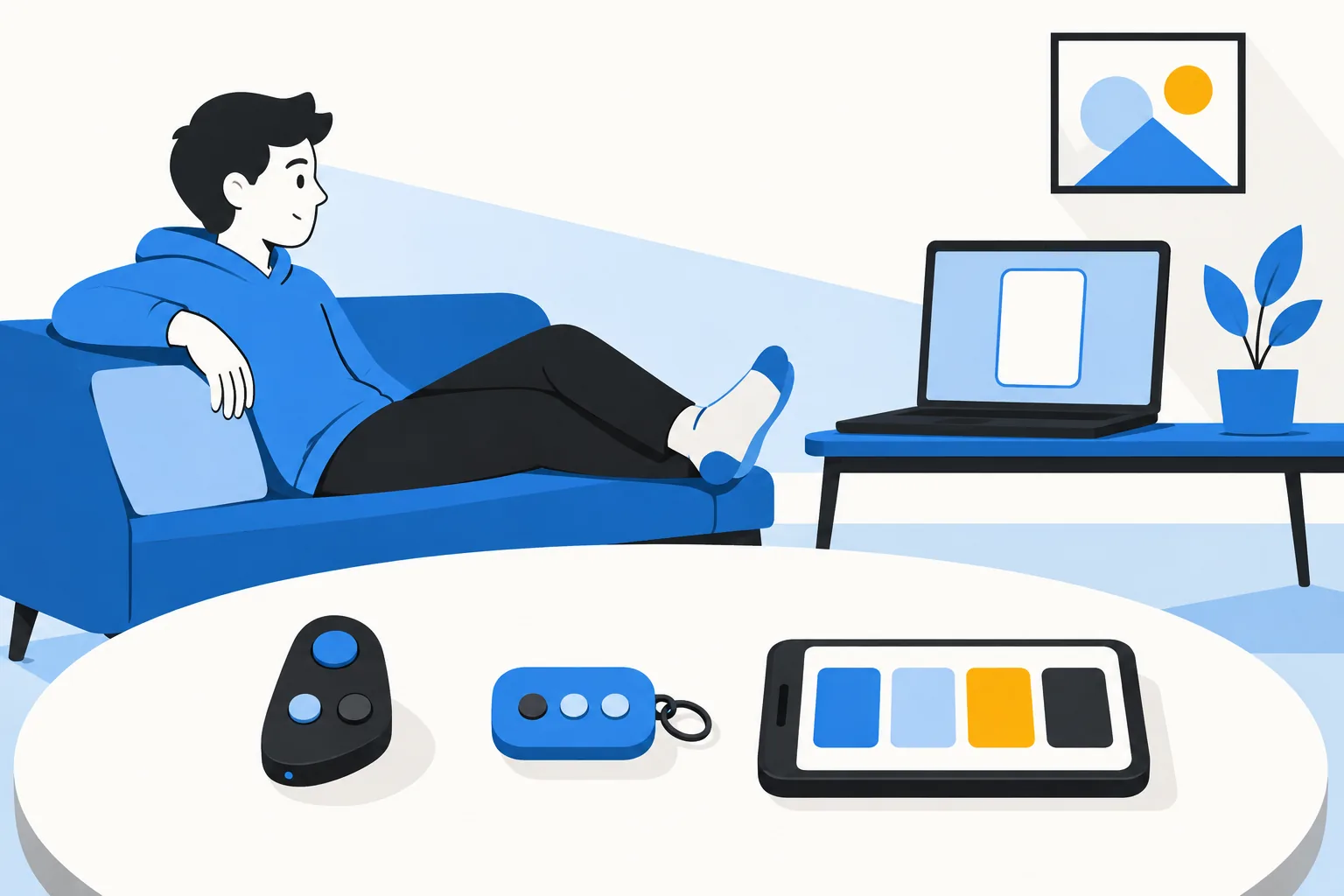
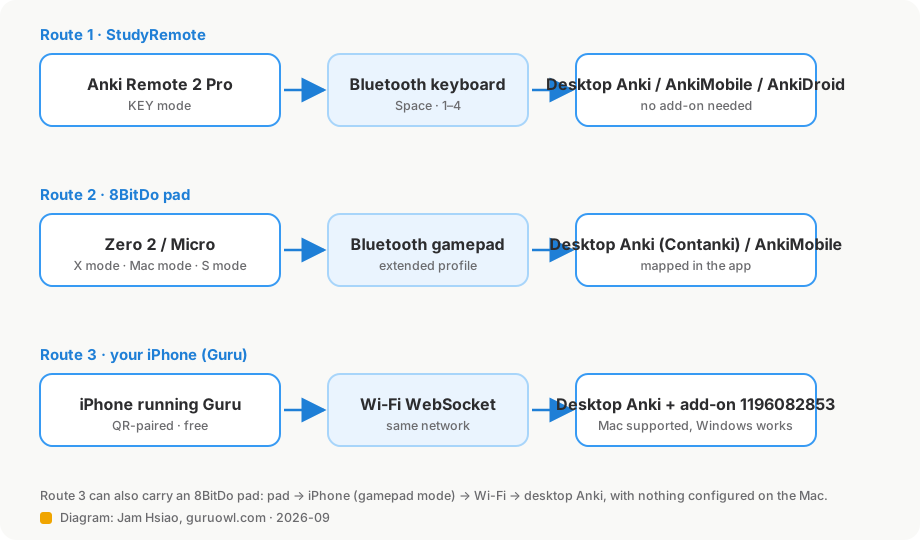
Three things get called an Anki remote, and the vendor of the first one says so itself: "Anki Remote, Anki Clicker, and Anki Controller are all the same thing." In practice:
- The StudyRemote Anki Remote — a purpose-built handheld with a main button, left/right/top buttons, a secondary button and a small joystick. Sold at studyremote.com; the old ankiremote.com address now redirects there.
- A small game controller — almost always an 8BitDo Zero 2 or Micro, paired to a computer with the Contanki add-on or to an iPad through AnkiMobile's gamepad settings.
- A phone — an iPhone acting as the clicker for desktop Anki over Wi-Fi. That is what Guru's remote does.
One point of order before the details: there is no official Anki remote. An Anki forum moderator put it plainly in 2025: "There's nothing 'official' about that remote. They're just using the Anki name." StudyRemote's own FAQ says the same in legal language. Neither Guru nor I am affiliated with Anki either.
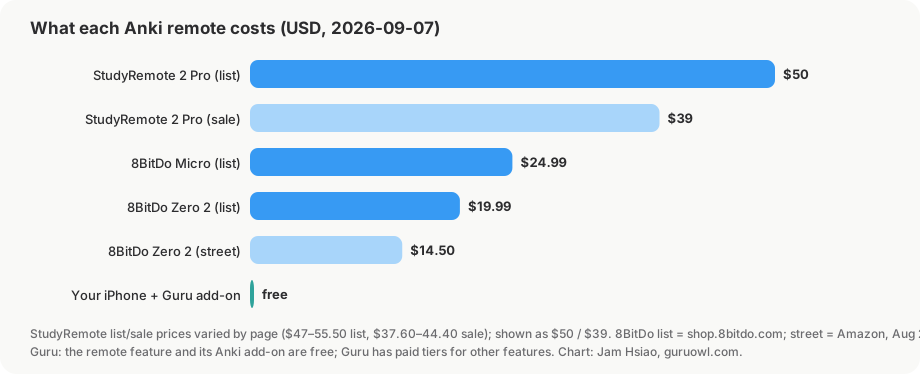
A note on sourcing: I have tested the 8BitDo pads and Guru's remote myself; I have not bought a StudyRemote unit. Everything about it below comes from StudyRemote's product, FAQ, setup and troubleshooting pages and from Anki forum threads, fetched on 2026-09-07. Prices were mid-sale that day, so I give ranges.
The StudyRemote Anki Remote 2 Pro
| Anki Remote 2 Pro | |
|---|---|
| Price | $49.99–52.67 list, $37.90–39.90 on sale (2026-09-07; four pages showed four numbers). Colours priced differently: Twilight Pink and Sky Blue $55.50 list. |
| Older model | Anki Remote 2.0 Classic Black, $47 list / $37.60 sale, still on the pricing page. |
| Connection | Bluetooth; "works as a keyboard". One active device at a time. No USB dongle mentioned. |
| Platforms | Mac, Windows, iPad, iPhone, Android (vendor). Remapping needs the desktop add-on, so on iPad/iPhone/Android you get the fixed layout. |
| Buttons | Gamepad-style: four face buttons (top, left, right, bottom), START and SELECT, and a joystick. Default KEY-mode layout per the add-on's own diagram: top = Hard, left = Again, right = Easy, bottom = Spacebar/Good, START = Decks, SELECT = Browse; joystick left = Undo, right = Reveal Hint, up/down = scroll. |
| Modes | Physical mode bar: KEY mode (keyboard signals, the one you want) and GAME mode. Vendor pages disagree on which bar position is which; the troubleshooting page and the iPad guide say KEY = bar down. |
| Battery | Standard 8 h or Extended 16 h variants; vendor quotes "8–20 hours of active use" from a 1.5 h charge. Charger: FAQ says micro-USB, the 2 Pro page says USB-C; check your unit. |
| Add-on | "Anki Remote – Customize", AnkiWeb code 693153301, needs Anki 2.1.50+. Unlocks the joystick (default Undo), dropdown remapping, Reveal Hint, Reveal Next Cloze, custom keystrokes. |
| Shipping | Free in the US, ships within 12 business hours. Outside the US: "Rarely" (their word); customers arrange forwarding. |
| Returns | 30 days, unused in original packaging, buyer pays return shipping. Replacement for defects within 60 days. No standard warranty period stated; a paid 1-year extended warranty exists. |
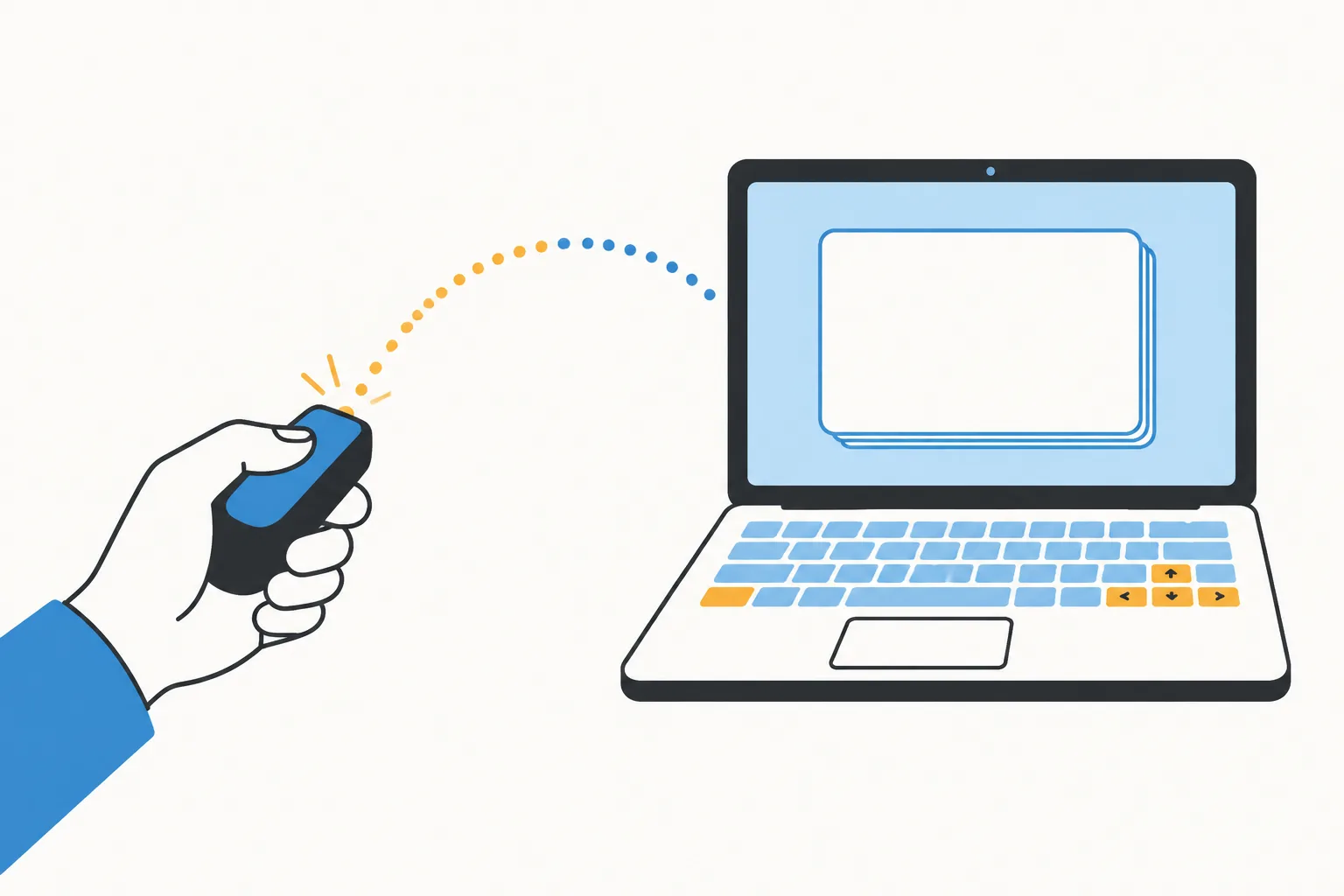
The vendor's pitch is "no drivers, no third-party software" on Mac. Their older setup guides, still live, tell Mac users to install Karabiner-Elements and grant it Input Monitoring, and tell Windows users to install AutoHotkey and run one of three .ahk profiles. Their 8BitDo comparison page says the 2 Pro "eliminated Karabiner Elements and AutoHotkey". Read that as: the 2 Pro should work as a plain keyboard, and the Karabiner/AutoHotkey pages are for the older unit or for custom layouts. If you buy one and it needs mapping software, that is why.
StudyRemote also publishes a survey ("94% more cards in 46% less time", 209 self-reported respondents, mostly medical students). It is the vendor's own survey, so treat it as a claim rather than a finding.
Setting it up
I installed the StudyRemote add-on in my own desktop Anki to see what the remapping actually looks like. It is a picture of the remote with a dropdown per button; the defaults above come from this screen.
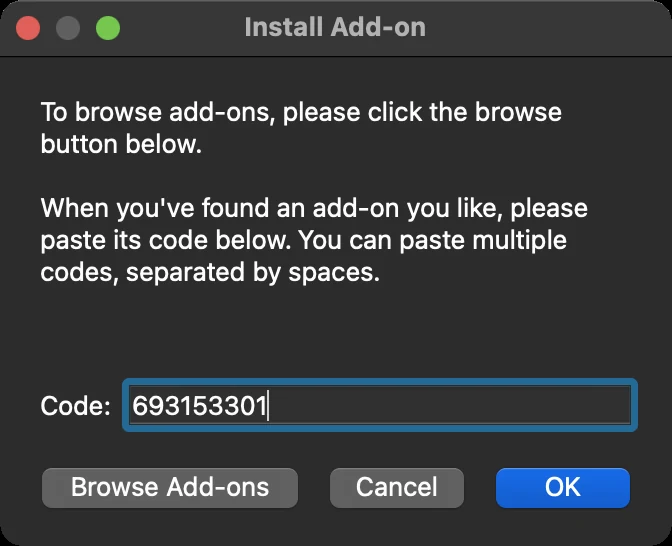
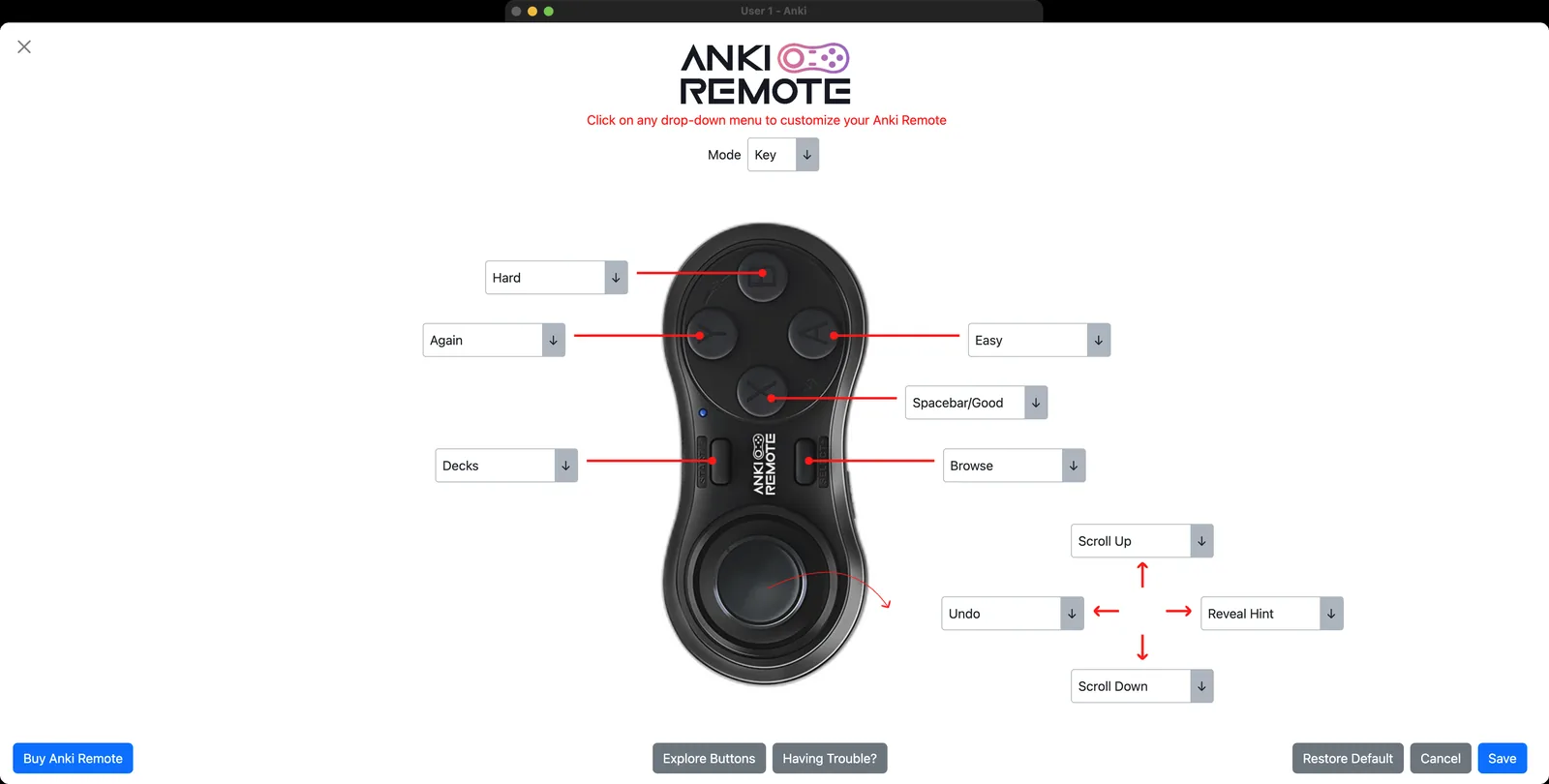
- Mac and Windows: pair "Anki Remote" in Bluetooth settings, slide the bar to KEY mode, open Anki. Install add-on 693153301 (Tools → Add-ons → Get Add-ons…) if you want to remap or use the joystick. macOS may ask for permissions under Privacy & Security; if the remote pairs but does nothing, uncheck and re-check them.
- iPad or iPhone with AnkiMobile: Settings → Bluetooth → pair "Anki Remote" while its LED blinks. AnkiMobile reads Bluetooth keyboards natively: Space shows the answer, 1–4 grade, r replays audio. The vendor's iPad page does not mention AnkiMobile's Gamepads settings because in KEY mode the remote is a keyboard, not a gamepad. One forum user reported their AnkiMobile gamepad mapping for this remote "reverts to default"; the answer was to keep it in KEY mode.
- Android with AnkiDroid: AnkiDroid Settings → Controls → Set Key Binds, then press the remote's buttons to assign them.
Power, pairing and the LED (the questions people actually search)
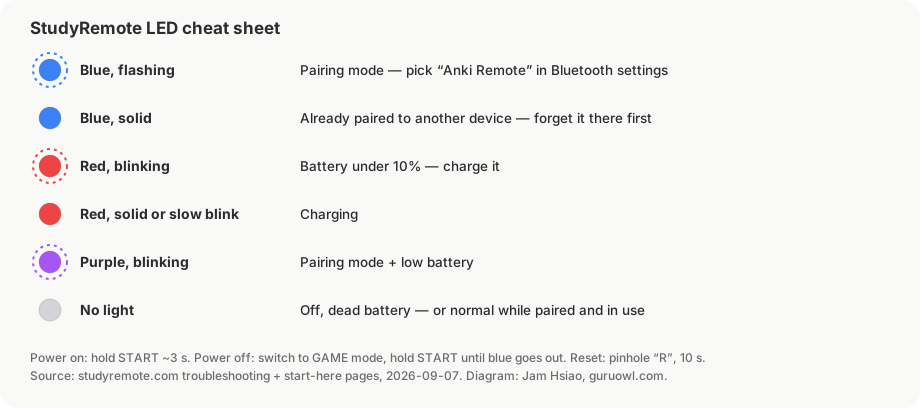
- Turn on: hold START about 3 seconds until the blue LED lights.
- Turn off: switch to GAME mode, then hold START until the blue LED goes out. This is the vendor's documented method; there is no separate power switch.
- Check whether it is on: press START for 1 second; a blue flash means on.
- Pairing mode: hold START until the blue light flashes twice (their Mac/Windows guides say three times), then keeps flashing every second.
- Solid blue: already paired to another device. This is the number-one reason it "won't connect": forget it on the old device first.
- Red blinking: under 10% battery. Purple blinking: pairing plus low battery. Solid or slow red: charging. No light while paired: normal.
- Hard reset: paperclip in the pinhole marked R on the back, hold 10 seconds, power cycle, pair again.
- Support is support@ankiremote.com; they ask for device model, OS version and what the LED is doing.
Alternative 1: an 8BitDo Zero 2 or Micro
These are the controllers most people mean when they say "Anki clicker". The Zero 2 lists at $19.99 (often $14–15 on Amazon), weighs 21 g, and has a D-pad, four face buttons and two shoulder buttons. The Micro lists at $24.99 (around $13–15 on sale), adds more buttons and a physical S/D/K mode switch, and charges over USB-C. Both run about 8–10 hours per charge. Neither is made for Anki; the trick is putting them in the right mode for the app you are using.
| Where you review | Zero 2 | Micro | Notes |
|---|---|---|---|
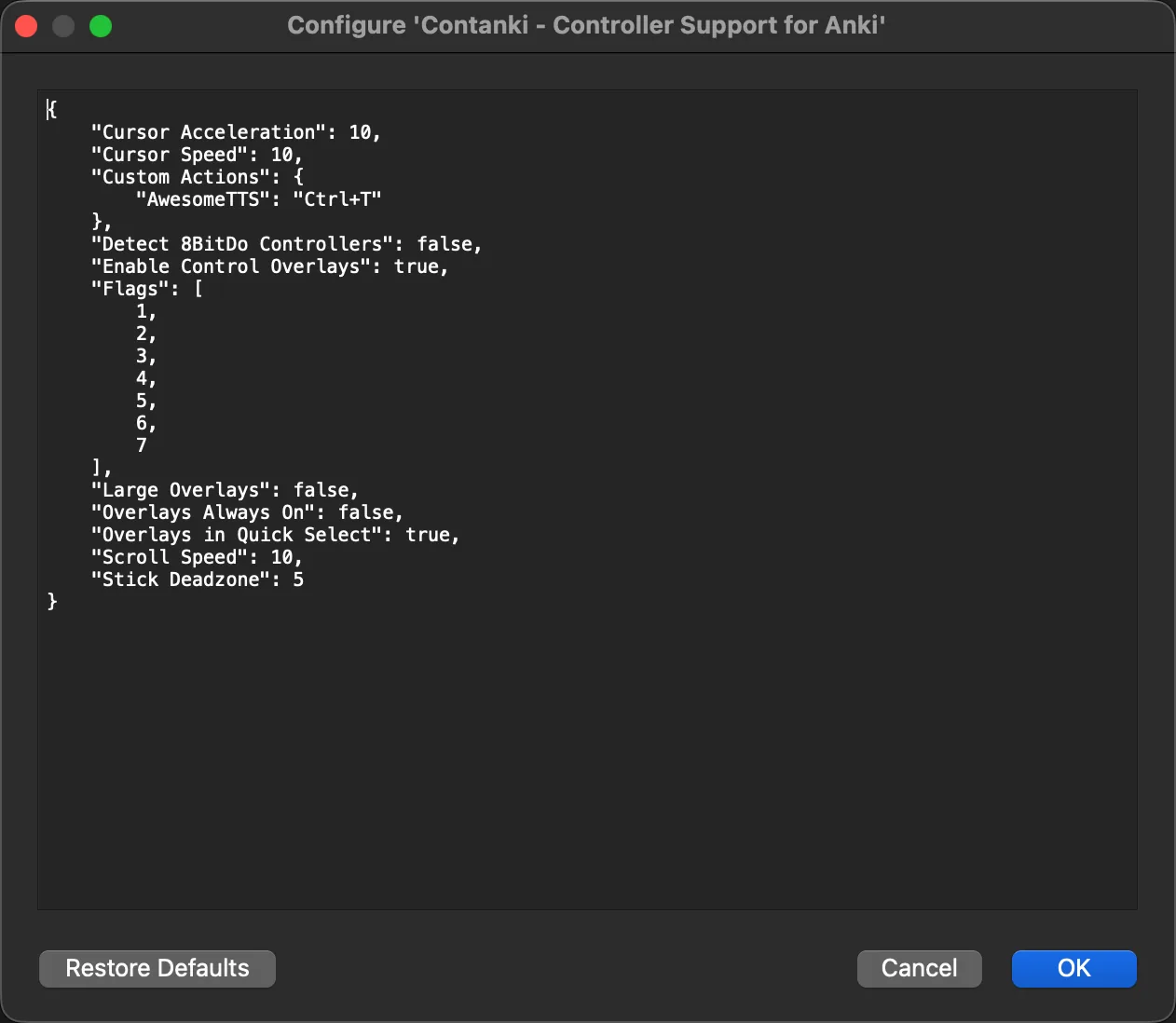
| Desktop Anki + Contanki (code 1898790263) | X-input mode (X+START) | D or X mode | If not detected: Tools → Controller Options → Detect 8BitDo Controllers. Keyboard mode gives "Controller not detected". |
| AnkiMobile on iPad/iPhone, gamepad settings | Mac mode (A+START), D-pad set to digital | S mode | Confirmed on the Anki forums by the AnkiMobile developer and by users; map buttons in Preferences → Review → Gamepads. |
| Any device, as a Bluetooth keyboard | Keyboard mode (R+START) | K mode | Default keys are letters (c–o on the Zero 2), not 1–4/Space. The Micro can be remapped in 8BitDo's mobile Ultimate Software; the Zero 2 cannot, officially. |
| Desktop Anki through your iPhone (Guru) | Mac mode (A+START) | S mode, or K mode remapped to 1–4/Space | Guru reads the extended gamepad profile (A Good, B Again, X Hard, Y Easy, shoulders Show Answer/Replay) and, from a keyboard, the keys 1–4, Space, R and Z/U. No desktop mapping software. |
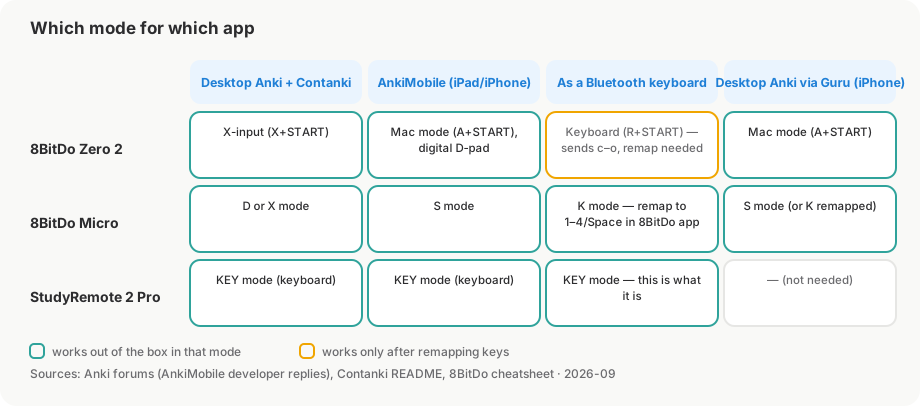
Two corrections to things you will read elsewhere, including in older posts on this site. First, the small 8BitDo pads do work with AnkiMobile: the Micro in S mode and the Zero 2 in Mac mode with a digital D-pad both map in AnkiMobile's gamepad settings, per the developer's own forum replies. What does not work is a pad exposing fewer buttons than iOS's extended controller profile, or an analog D-pad. Second, "keyboard mode" does not send 1/2/3/4 out of the box; it sends letters, so on a device without remapping you need something in between.
Known problems from the forums, so you are not surprised: a Micro in D mode over Bluetooth caused repeated kernel panics on an M3 MacBook Air (wired USB-C avoided it); a Zero 2 stopped pairing on Windows after three weeks and was replaced under warranty; installing 8BitDo's Windows software once broke Contanki until a factory reset; and both pads only hold one active pairing, so an iPad-paired pad "won't connect" to a Mac until you forget it on the iPad. Our 8BitDo setup guide and Contanki guide cover the button maps.
Alternative 2: your iPhone as the remote (free)
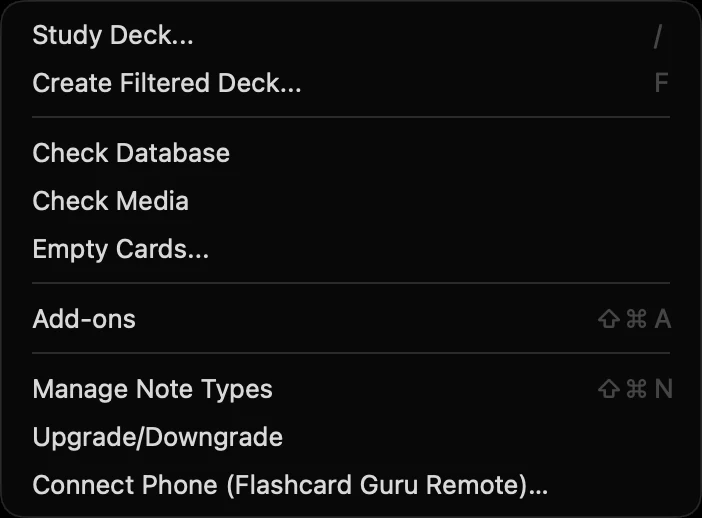
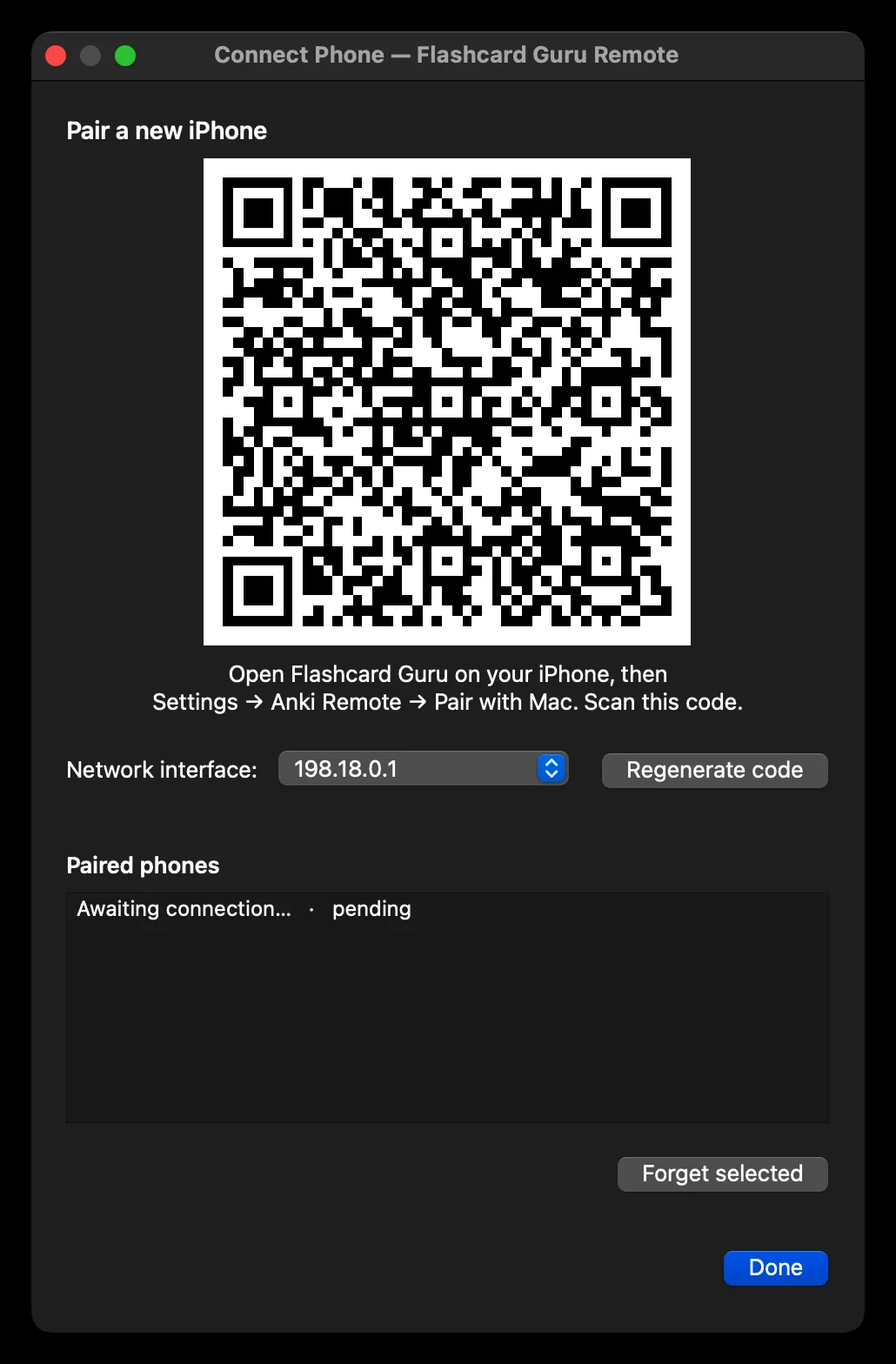
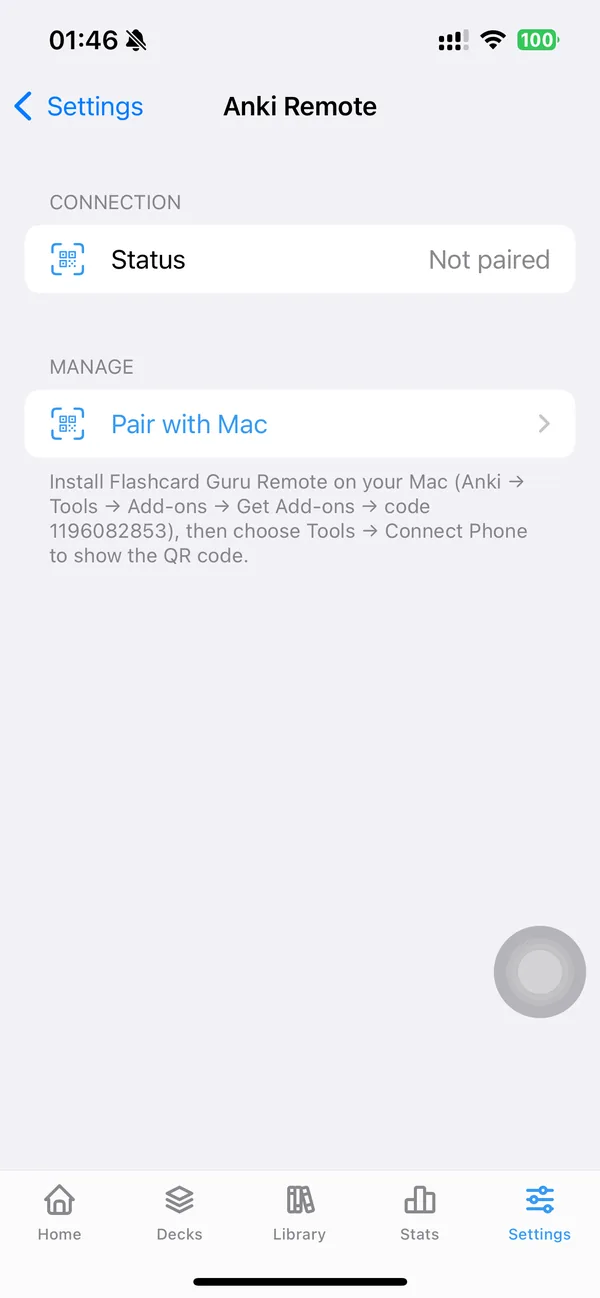
Guru ships a desktop Anki add-on, "Flashcard Guru Remote" (AnkiWeb code 1196082853, LGPL-3.0, source on GitHub), that turns the iPhone or iPad you already own into the clicker for desktop Anki. Pairing is a QR code: in Anki, Tools → Connect Phone; in Guru, Settings → Anki Remote → Pair with Mac; scan.
Because the phone is a full device rather than a keyboard, it can also act as the bridge for a controller: pair an 8BitDo pad with the phone in gamepad mode (Mac mode on the Zero 2, S on the Micro) and Guru forwards its buttons to desktop Anki, so the pad never has to talk to the Mac at all. In keyboard mode the pad has to send 1–4 and Space, which the Micro can be set to in 8BitDo's app and the Zero 2 cannot. That sidesteps Contanki's mode requirements and the Karabiner question entirely.
Limits, stated plainly: it drives desktop Anki only. It does not control AnkiMobile, because iOS does not let a third-party app act as a Bluetooth keyboard for another app. Anki 2.1.55+ on Qt6 is required; macOS is the supported desktop, Windows works but is not actively tested. The add-on and the remote feature are free and never use AI credits; Guru itself has paid tiers for other features. Full walkthrough: Free Anki Remote: iPhone vs StudyRemote vs 8BitDo.
Side by side
| StudyRemote Anki Remote 2 Pro | 8BitDo Zero 2 / Micro | iPhone via Guru | |
|---|---|---|---|
| Cost | $38–50, US shipping | $13–25, sold everywhere | Free (your phone) |
| Desktop Anki | Yes (keyboard; add-on for remap) | Yes (Contanki, X mode) | Yes (Wi-Fi add-on) |
| AnkiMobile | Yes (keyboard mode, fixed layout) | Yes (gamepad mode, mappable) | No |
| AnkiDroid | Yes (key binds) | Mixed reports | No |
| Extra software | None for the 2 Pro; Karabiner/AutoHotkey in older guides | Contanki on desktop; none on iPad | Anki add-on + Guru app |
| Battery | 8 or 16 h variants | 8–10 h | Your phone's |
| Reveal hint / next cloze | With the add-on, desktop only | Via Contanki bindings, desktop only | Not yet |
| Fails when | Paired to another device; wrong mode | Wrong mode for the app; one pairing at a time | Phone and Mac on different Wi-Fi |
Which one to get
- You review on desktop and want zero configuration: the StudyRemote unit is the only one designed for exactly this, and $40 is not much against a year of Step prep. Buy it in KEY mode terms: it is a keyboard with an ergonomic shell.
- You review on iPad or iPhone in AnkiMobile: an 8BitDo Micro in S mode is the cheapest thing that maps every button in AnkiMobile's gamepad settings. The StudyRemote works too, with its fixed layout.
- You review on desktop and already own an iPhone: start with Guru's remote. It costs nothing, pairs in seconds, and if you later want a physical clicker, the same 8BitDo pad works through the phone without touching Contanki.
- You are outside the US: StudyRemote rarely ships internationally; 8BitDo pads and the phone route are the practical options.
FAQ
Is the Anki Remote an official Anki product? No. It is made by StudyRemote, whose FAQ states it is "not endorsed, sponsored, or affiliated with Ankitects Pty Ltd or Ankiweb." Anki, the software, has no official remote.
Does the Anki Remote work with AnkiMobile on iPhone? Yes, as a Bluetooth keyboard in KEY mode. AnkiMobile reads Space, 1–4 and r from any Bluetooth keyboard. You cannot remap the buttons on iOS because the remapping add-on runs only in desktop Anki.
How do I turn off the Anki Remote? Slide the mode bar to GAME mode, then hold START until the blue LED goes out. To check it is off, press START for one second; no blue flash means off.
Why won't my Anki Remote connect? In order of likelihood from the vendor's own troubleshooting page: it is still paired to another device (solid blue LED; forget it there first), it is in GAME mode instead of KEY mode, the battery is under 10% (red blink), or macOS permissions were never granted. Last resort: the 10-second pinhole reset.
Can a $15 8BitDo do the same job? For grading cards, yes, on desktop with Contanki and on iPad in AnkiMobile's gamepad mode. What you give up is the ergonomic one-hand shell, the "just turn it on" setup, and a vendor support address. What you gain is a pad that also works with the Guru phone bridge and costs a third as much.
Which option can reveal AnKing hints or the next cloze? On desktop: the StudyRemote add-on (Reveal Hint, Reveal Next Cloze bindings) or Contanki with a custom keystroke. AnkiMobile has no built-in hint shortcut for gamepads, which is a recurring forum request; the phone route does not do it yet either.
Try the free route first
Install the Flashcard Guru Remote add-on in desktop Anki, pair your iPhone with a QR code, and grade cards from across the room. No hardware to buy, nothing to charge.
Set up the iPhone remote